


Adding speed camera POI to your SatNav DVD


Senior Members
Joined: Feb 2006
Posts: 365
Likes: 0
From: Geel, Belgium
My Ride: 520d M-sport - Steptronic - Carbon Black - Auburn Leather - Mem Seat - Cup Holders - Nav Pro - Light Pack - Dim/folding mirrors - Adv Airco - PDC - Aux/in - Non-smoke pack - De-badged - Delivery Mar 31, 2006

Mathmos - this is absolutely outstanding ! 
The longest wait was for the perl thing to complete installation (about 60 min of installation time) but lucky enough for me, this was work for the computer.
I read many people wasted a few DVD's, but this is not really necessary. I have put all this on a re-writable DVD RW- and this is perfectly accepted by the car's nav reader.
So keeping the list up-to-date gores without additional cost and is only a matter of downloading the new list again, running it through the perl script and re-burning the DVD again. In short
- Keep a shortcut to the downloadable POIs websites in your favorites
- Keep a copy of the DVD on the hard-drive
- Keeping a shortcut to your nice documentation on how to run the perl script and which files to replace
is all there is to stay organised for quick future updates!
Small note: Since I have the Dutch language activated on my I-drive, and this language is not supported on the DVD, it autoamtically defaults back to the DVD's default language. If I have time, I may translate my own CD for the POI descriptions and misuse the other languages available on the idrive that I don't use.
Did you fiddle with the color options in the htm files? Would that be interpreted by the Idrive and allow some re-coloring of the backgound?
The longest wait was for the perl thing to complete installation (about 60 min of installation time) but lucky enough for me, this was work for the computer.
I read many people wasted a few DVD's, but this is not really necessary. I have put all this on a re-writable DVD RW- and this is perfectly accepted by the car's nav reader.
So keeping the list up-to-date gores without additional cost and is only a matter of downloading the new list again, running it through the perl script and re-burning the DVD again. In short
- Keep a shortcut to the downloadable POIs websites in your favorites
- Keep a copy of the DVD on the hard-drive
- Keeping a shortcut to your nice documentation on how to run the perl script and which files to replace
is all there is to stay organised for quick future updates!
Small note: Since I have the Dutch language activated on my I-drive, and this language is not supported on the DVD, it autoamtically defaults back to the DVD's default language. If I have time, I may translate my own CD for the POI descriptions and misuse the other languages available on the idrive that I don't use.
Did you fiddle with the color options in the htm files? Would that be interpreted by the Idrive and allow some re-coloring of the backgound?

Contributors
Joined: Mar 2005
Posts: 225
Likes: 0
From: Kent, UK
Originally Posted by Tommy' post='295118' date='Jun 9 2006, 04:27 PM
I read many people wasted a few DVD's, but this is not really necessary. I have put all this on a re-writable DVD RW- and this is perfectly accepted by the car's nav reader.
This is good to know and I have mentioned this in the How To, thanks.

Contributors
Joined: Nov 2005
Posts: 4,719
Likes: 3
From: London, UK
My Ride: BMW E60 520d SE Saloon M47 2.0dTitanium Grey II, Grey−Dakota Leather, Visibility Package, Media Package, Through Load System, Lumbar support − fr seats, Automatic Air Conditioning−Advanced, High beam assistant, Hi−Fi Loudspeak
Model Year: 2006
Some older nav units do not like DVD+RWs. The newer cars are fine but also note that DVD-RW are a lot slower that the DVD+R
Contributors
Joined: Mar 2005
Posts: 225
Likes: 0
From: Kent, UK
Originally Posted by bruce_miranda' post='295205' date='Jun 9 2006, 07:19 PM
Some older nav units do not like DVD+RWs. The newer cars are fine but also note that DVD-RW are a lot slower that the DVD+R

Contributors
Joined: Nov 2005
Posts: 4,719
Likes: 3
From: London, UK
My Ride: BMW E60 520d SE Saloon M47 2.0dTitanium Grey II, Grey−Dakota Leather, Visibility Package, Media Package, Through Load System, Lumbar support − fr seats, Automatic Air Conditioning−Advanced, High beam assistant, Hi−Fi Loudspeak
Model Year: 2006
Originally Posted by bruce_miranda' post='293883' date='Jun 7 2006, 03:50 PM
There must be a way to display the Speed Cameras without having to choose the Category from the Information menu. The reason I'm sure if that I sometimes see icons for hotels etc on the navigation screen without having chosen it. Give me some time I'm sure I'll crack this one as well.
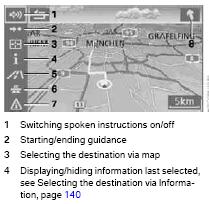
Choose the Speed Cameras from the information menu first. Then select your destination as per normal. When the route is being displayed you should see the [i] icon (number 4) on the left hand side of the map display stuck off. Go to that icon and enable that. You should get the speed cameras displayed while using the guidance for something else.
See image for details.

Contributors
Joined: Jul 2004
Posts: 3,486
Likes: 0
From: expat in The Netherlands
My Ride: BMW 545iA Black Sapphire
Model Year: 2005
Engine: 545i
ehhmmm....  sorry I didn't go through the whole thread, but does this work for Holland as well ? if yes, where does one find the Dutch camera POI's ?
sorry I didn't go through the whole thread, but does this work for Holland as well ? if yes, where does one find the Dutch camera POI's ?
Contributors
Joined: Mar 2005
Posts: 225
Likes: 0
From: Kent, UK
Originally Posted by andy545' post='295995' date='Jun 11 2006, 09:45 PM
ehhmmm.... sorry I didn't go through the whole thread, but does this work for Holland as well ? if yes, where does one find the Dutch camera POI's ?
sorry I didn't go through the whole thread, but does this work for Holland as well ? if yes, where does one find the Dutch camera POI's ? however a quick google and I think this site http://www.flitspaal.nl/ might have them.
Contributors
Joined: Mar 2005
Posts: 225
Likes: 0
From: Kent, UK
This post at http://www.gpspassion.com/forumsen/t...TOPIC_ID=51627 has a collection of links for speed cameras in Europe which may be of interest to some people.
Contributors
Joined: Mar 2005
Posts: 225
Likes: 0
From: Kent, UK
The 'Adding Speed Camera POI to your BMW Professional NAV DVD' How To can now be found at
http://www.bmwnavaddpoi.co.uk/
http://www.bmwnavaddpoi.co.uk/