


BMW Nav update

Senior Members
Joined: Mar 2008
Posts: 872
Likes: 0
From: Toronto, Canada
My Ride: 2004 545i TITANIUM GREY II on Black Dakota Lthr, Comfort Seats, Sports PKG, Premium PKG, Active/Dynamic Drive, NAV, Winter Package.

I found it. Go under "i" icon on the left side of the nav and choose destination on location the car and travel you will see the Red light camera, choose it and search for it then exit and go back to the map you will see the camera icons showing on the map.

Senior Members
Joined: Jan 2008
Posts: 1,099
Likes: 0
From: Denva, CO Baby
My Ride: 2005 545i /w Sport pkg - SMG - Nav - Premium pkg - PDC - Ready to begin my modding! =)
It amazes me that BMW would sell you a $65k car and not provide Nav firmware support along with the NAV discs every year they update!
 I think more people would be more apt to spend $200-300 on a newer Nav disc every year, if BMW would spend some time updating the actual NAV system, instead of just giving you an updated phone book!
 my $.02!
Now that I am done testing, Im heading straight to my "stealership" to do the right thing!


Senior Members
Joined: Jan 2008
Posts: 1,099
Likes: 0
From: Denva, CO Baby
My Ride: 2005 545i /w Sport pkg - SMG - Nav - Premium pkg - PDC - Ready to begin my modding! =)
Could be a newer cam?? I tried mine this morning on the way to work and the red light cam close by my office showed up with no issues, but that particular one has been there a few years.

Members
Joined: Jun 2005
Posts: 136
Likes: 0
From: Seattle, WA
My Ride: 530xiT
It amazes me that BMW would sell you a $65k car and not provide Nav firmware support along with the NAV discs every year they update! I think more people would be more apt to spend $200-300 on a newer Nav disc every year, if BMW would spend some time updating the actual NAV system, instead of just giving you an updated phone book!
my $.02!
Now that I am done testing, Im heading straight to my "stealership" to do the right thing!
I think more people would be more apt to spend $200-300 on a newer Nav disc every year, if BMW would spend some time updating the actual NAV system, instead of just giving you an updated phone book! my $.02!
Now that I am done testing, Im heading straight to my "stealership" to do the right thing!
Contributors
Joined: Aug 2005
Posts: 11,432
Likes: 1
From: San Jose, CA
My Ride: E60 M5, F85 X5M
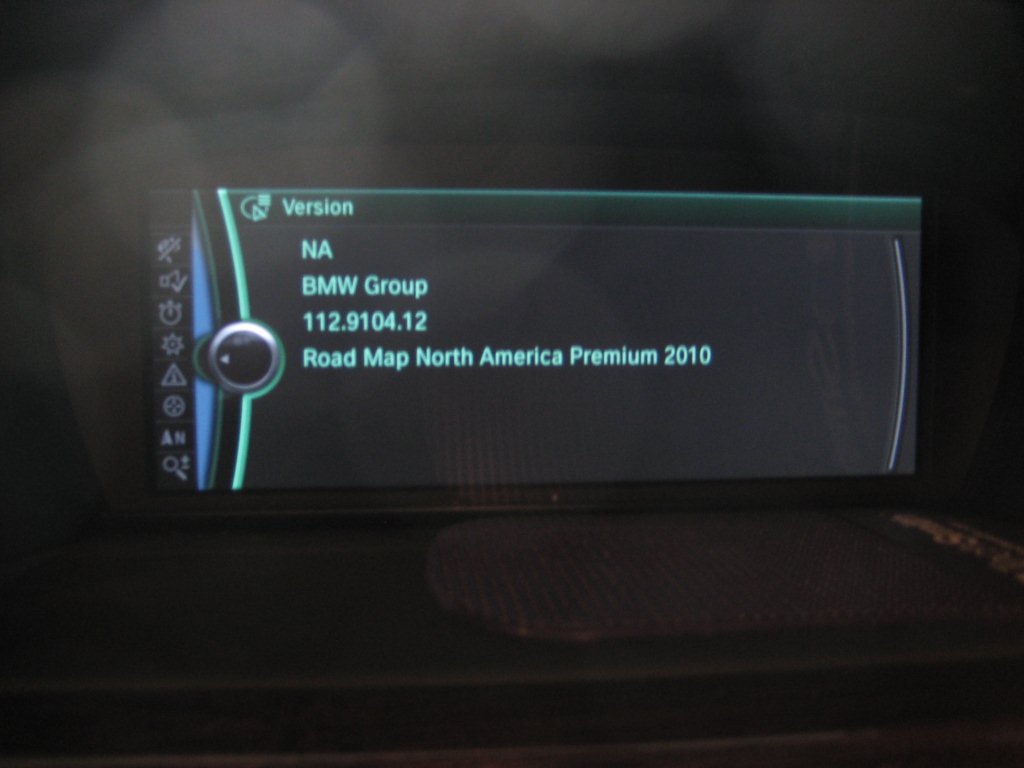
I paid $330 to update my hard drive based system...no user installed DVD update is available. However, I think the firmware was updated
Attachment 104910
Attachment 104910

Senior Members
Joined: Oct 2008
Posts: 1,185
Likes: 0
From: B-Ham, AL
My Ride: '06 550i
'84 Nissan S12 Turbo
Yep...that's it. Sorry for the late post
Members
Joined: Jun 2005
Posts: 136
Likes: 0
From: Seattle, WA
My Ride: 530xiT
This is what I've been wondering about; so we can have our old Nav system upgraded to this new interface? Is it through a software upgrade or something else? Been driving a 335d loaner car this past week and really like how the nav works. The interface looks just like the picture you posted.
Senior Members
Joined: Mar 2008
Posts: 872
Likes: 0
From: Toronto, Canada
My Ride: 2004 545i TITANIUM GREY II on Black Dakota Lthr, Comfort Seats, Sports PKG, Premium PKG, Active/Dynamic Drive, NAV, Winter Package.
No you cannot have our old Nav upgraded to this new one for multiple reasons: 1. the new system is a hard drive based navigation (No DVD) and this what member rhnorb got upgraded his maps software for $300. 2. The new system has a 10" screen vs our 8" screen and a much faster processor for the complete iDrive. I bet you if BMW wants they can modify our interface even thus it is a DVD based system to look similar to the new one with better graphics just the way they added the Birdview but BMW want do it.
This is what I've been wondering about; so we can have our old Nav system upgraded to this new interface? Is it through a software upgrade or something else? Been driving a 335d loaner car this past week and really like how the nav works. The interface looks just like the picture you posted.
Senior Members
Joined: Mar 2008
Posts: 872
Likes: 0
From: Toronto, Canada
My Ride: 2004 545i TITANIUM GREY II on Black Dakota Lthr, Comfort Seats, Sports PKG, Premium PKG, Active/Dynamic Drive, NAV, Winter Package.
IceyTys I'm glade that you finished TESTING the new software and on your way to the STEALER to get you legit copy 
It amazes me that BMW would sell you a $65k car and not provide Nav firmware support along with the NAV discs every year they update! I think more people would be more apt to spend $200-300 on a newer Nav disc every year, if BMW would spend some time updating the actual NAV system, instead of just giving you an updated phone book!
my $.02!
Now that I am done testing, Im heading straight to my "stealership" to do the right thing!
I think more people would be more apt to spend $200-300 on a newer Nav disc every year, if BMW would spend some time updating the actual NAV system, instead of just giving you an updated phone book! my $.02!
Now that I am done testing, Im heading straight to my "stealership" to do the right thing!