


Adding speed camera POI to your SatNav DVD


Members
Joined: Jun 2006
Posts: 39
Likes: 0

Well at last I have everything working.
Took a trip to the dealer to pick up my 2007-2 offer at ?99.
However was told that because of the offer, stocks had run out and it would be 3 weeks before new stocks arrived.
I asked if they could just try a 2007-2 out of another vehicle, to confirm that my vehicle did or did not require a iDrive software update.
He agreed and returned with a brand new 2007-2, undid the wrapping and stuck the DVD in the drive.
He did not even wait 5 minutes, hit the iDrive knob over to Navigation and BINGO, there was the 2007-2 Map in all it's glory.
He then looked at my existing DVD 2006-1 and said he thought there was a problem with this version and may be possible to exchange it for the 2007-2.
He then ejected the 2007-2 and put my 2006-1 back in and it popped up the error "DVD Read Error".
That's what I thought would happen he said, so off we went back inside.
After a few minutes my 2006-1 was exchanged for the 2007-2.
Once I was back home I ejected the original and stuck my mod version in.
At last it's working.
Now is there some code on the original, that's hidden because other than sticking the original in for a couple of minutes the mod would not work without it.
You would think that the copy was no different to the original other than the added POI camera files.
Beats Me.
Thanks to those that have helped in this very frustrating niggle.
Took a trip to the dealer to pick up my 2007-2 offer at ?99.
However was told that because of the offer, stocks had run out and it would be 3 weeks before new stocks arrived.
I asked if they could just try a 2007-2 out of another vehicle, to confirm that my vehicle did or did not require a iDrive software update.
He agreed and returned with a brand new 2007-2, undid the wrapping and stuck the DVD in the drive.
He did not even wait 5 minutes, hit the iDrive knob over to Navigation and BINGO, there was the 2007-2 Map in all it's glory.
He then looked at my existing DVD 2006-1 and said he thought there was a problem with this version and may be possible to exchange it for the 2007-2.
He then ejected the 2007-2 and put my 2006-1 back in and it popped up the error "DVD Read Error".
That's what I thought would happen he said, so off we went back inside.
After a few minutes my 2006-1 was exchanged for the 2007-2.
Once I was back home I ejected the original and stuck my mod version in.
At last it's working.
Now is there some code on the original, that's hidden because other than sticking the original in for a couple of minutes the mod would not work without it.
You would think that the copy was no different to the original other than the added POI camera files.
Beats Me.
Thanks to those that have helped in this very frustrating niggle.

Contributors
Joined: Mar 2005
Posts: 225
Likes: 0
From: Kent, UK
I installed cygwin (including perl) to c:\cygwin.
But now I'm lost.
I must confess that I'm not confortable using command lines, but I will learn.
I suppose that to enter a command you use the execute function in the Windows start menu ?
But now I'm lost.
I must confess that I'm not confortable using command lines, but I will learn.
I suppose that to enter a command you use the execute function in the Windows start menu ?
or Start|Run
enter cmd in the box and then click on OK
The "c:\cygwin\bin\perl -v" command line doesn't work (no screen is displayed as shown by the method)
Where do you install/put the perl script?
Where do you put the .asc file to be converted?
How do you exactly enter the command line to run the script and produce the .idx and .url files?
Where do you put the .asc file to be converted?
How do you exactly enter the command line to run the script and produce the .idx and .url files?
c:\cygwin\bin\perl createidxurl.pl pocketgps_uk_sc.asc 9000
and this results in the idx and url files being created in C:\ as well. But you can keep them whereever you want, you might just need to adjust your command line accordingly.
Contributors
Joined: Mar 2005
Posts: 225
Likes: 0
From: Kent, UK
The modified dvd works fine and the speed cameras are inside the system BUT NEVER VISUALISED ON THE SCREEN.
Contributors
Joined: Mar 2005
Posts: 225
Likes: 0
From: Kent, UK
I've updated www.bmwnavaddpoi.co.uk to include some sample ENG.LSC files for 2006-01 DVDs onwards.
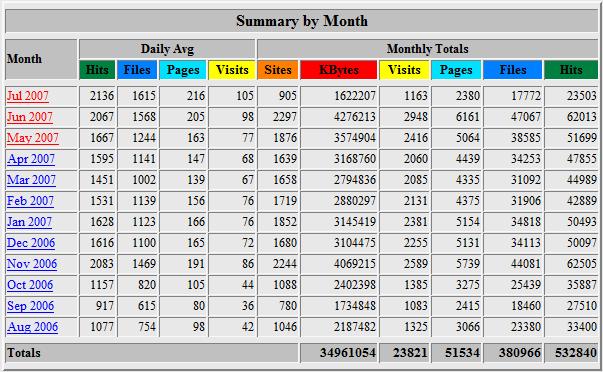
For those who are interested here are some of the stats for www.bmwnavaddpoi.co.uk:
First is a monthly breakdown of usage since the site was setup last year
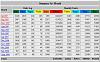
and this is a breakdown of visitors by country for July 2007 so far ( 01st - 11th inclusive)
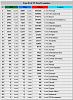
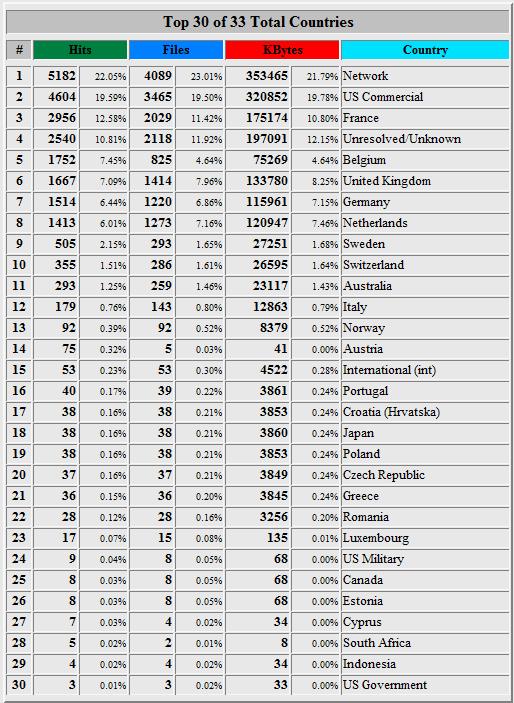
For those who are interested here are some of the stats for www.bmwnavaddpoi.co.uk:
First is a monthly breakdown of usage since the site was setup last year
and this is a breakdown of visitors by country for July 2007 so far ( 01st - 11th inclusive)
Contributors
Joined: Mar 2005
Posts: 225
Likes: 0
From: Kent, UK
Volunteers required! 
I've now added the capability to generate the required idx and url files on the site itself from an input file you upload.
Hopefully those people who are having problems getting perl installed and running locally or who would rather not fiddle about with perl altogether will find this of use, as you no longer have to worry about this particular stage because the web site will generate the required files for you.
I have tested the process and it all appears to work ok but ideally I'd like a few brave souls to try it out for me before I make it publicly available in case I've overlooked any gotchas. Ideally I'd like you to upload your asc input file, download the generated idx and url files and then if you wouldn't mind add them to your dvd image, burn the dvd and tryout in your car.
If you would like to give this a try then please PM me and I'll let you have the required info.
Thanks you
I've now added the capability to generate the required idx and url files on the site itself from an input file you upload.
Hopefully those people who are having problems getting perl installed and running locally or who would rather not fiddle about with perl altogether will find this of use, as you no longer have to worry about this particular stage because the web site will generate the required files for you.
I have tested the process and it all appears to work ok but ideally I'd like a few brave souls to try it out for me before I make it publicly available in case I've overlooked any gotchas. Ideally I'd like you to upload your asc input file, download the generated idx and url files and then if you wouldn't mind add them to your dvd image, burn the dvd and tryout in your car.
If you would like to give this a try then please PM me and I'll let you have the required info.
Thanks you

Members
Joined: Sep 2007
Posts: 1
Likes: 0
If anyone's interested, I've just spent most of today working out how to do all this on a Mac and to be honest, it's quite easy (only 2 wasted disks, 3rd time lucky!) as most of the commands can be done within the Terminal application.

Members
Joined: Aug 2007
Posts: 12
Likes: 0
From: NW England
My Ride: 525D SE 2006 - Standard except Eibach Sports springs
Hello - having to resurrect the thread.
I've got cygwin installed and followed all the instructions so far - checked through command prompt and perl is working.
It's here I'm getting stuck though - i've put the createidxurl.pl and the pocketgps_uk_sc.asc file in the c:\cygwin\bin folder - is this right?
I run c:\cygwin\bin\perl createidxurl.pl pocketgps_uk_sc.asc 9000 from command promt and it comes up with it cant open the perl script - no such file or directory.
I know it must be something simple but I'm tearing my hair out here!
Any help greatly appreciated, thanks.
*********************************************
Looked to have done it - I hadn't changed the command prompt to my F drive before putting in the c:........
Off to burn and test.
I've got cygwin installed and followed all the instructions so far - checked through command prompt and perl is working.
It's here I'm getting stuck though - i've put the createidxurl.pl and the pocketgps_uk_sc.asc file in the c:\cygwin\bin folder - is this right?
I run c:\cygwin\bin\perl createidxurl.pl pocketgps_uk_sc.asc 9000 from command promt and it comes up with it cant open the perl script - no such file or directory.
I know it must be something simple but I'm tearing my hair out here!
Any help greatly appreciated, thanks.
*********************************************
Looked to have done it - I hadn't changed the command prompt to my F drive before putting in the c:........
Off to burn and test.

Members
Joined: Sep 2007
Posts: 1
Likes: 0
Read thru all the posts here and on other forums but no information on how to handle smaller maps CDs.
The differense is that they only got the 5 or 6 files in the root of the cd. No directorys for POI. Any ideas how to add Speedcams to them??
Im trying to do this on Scandinavia.
The differense is that they only got the 5 or 6 files in the root of the cd. No directorys for POI. Any ideas how to add Speedcams to them??
Im trying to do this on Scandinavia.
