


Installing Lci iDrive controller on ccc system


Thread Starter
Members
Joined: Mar 2011
Posts: 45
Likes: 0
From: Sydney, Australia

Hi Guys,
I want to install the LCI iDrive controller on my 2007 LCI 530i which runs on CCC, where can I find a DIY or link to such an install.
Any help would be appreciated.
Thanks.
I want to install the LCI iDrive controller on my 2007 LCI 530i which runs on CCC, where can I find a DIY or link to such an install.
Any help would be appreciated.
Thanks.
Senior Members
Joined: May 2011
Posts: 807
Likes: 0
From: nyc
? You mean the knob? If so you already have lci car shouldn't you have an lci controller ? If for some reason you don't it just pops right off by pulling on it. If you mean cic controller that's a bit different. Check the cic retrofit monster thread I believe they talk about it there. I know it involves cutting the trim piece to make the.controller fit maybe coding.
Thread Starter
Members
Joined: Mar 2011
Posts: 45
Likes: 0
From: Sydney, Australia
I mean the cic controller.
Thanks
Thanks
? You mean the knob? If so you already have lci car shouldn't you have an lci controller ? If for some reason you don't it just pops right off by pulling on it. If you mean cic controller that's a bit different. Check the cic retrofit monster thread I believe they talk about it there. I know it involves cutting the trim piece to make the.controller fit maybe coding.

Members
Joined: Jun 2012
Posts: 12
Likes: 0
From: Romania
i had CCC lci professional and i made it work. you need someone to make upgrade to your CCC to make it work with CIC idrive. and then u have to do the rest. need another trim console and also cut the console.
just be careful. your CCC can die. i heard this is possible to happen during upgrade i had luck mine did not died.
i have CIC now on my car. I have the CCC with display and idrive for sale if someone is interested.
the new idrive is a very good upgrade. looks better and easier to use it.
good luck
just be careful. your CCC can die. i heard this is possible to happen during upgrade
i had luck mine did not died.i have CIC now on my car. I have the CCC with display and idrive for sale if someone is interested.
the new idrive is a very good upgrade. looks better and easier to use it.
good luck

Senior Members
Joined: Sep 2010
Posts: 568
Likes: 3
From: LA
My Ride: 2012 535i M-Sport
This has been discussed several times here and is super easy to do. WinKFP is really easy to use once you get the hang of it. The update process takes 20-30 min max and it is rare for it to fail or brick your CGATE. If anyone here needs help with this in Southern California let me know - I can also talk you through it on the phone if your coding software is up to date.

Senior Members
Joined: Jan 2011
Posts: 2,348
Likes: 3
From: UpState SC
My Ride: 2008 535i LCI with sports/premium package, Sports trans with paddle shifters, CF emblems, JB4 Software, Dinan Exhaust, Navigation, M5Tech body kit, Carbon wrap interrior trim and CIC Controller.
Thanks to Sublime for all of his help!
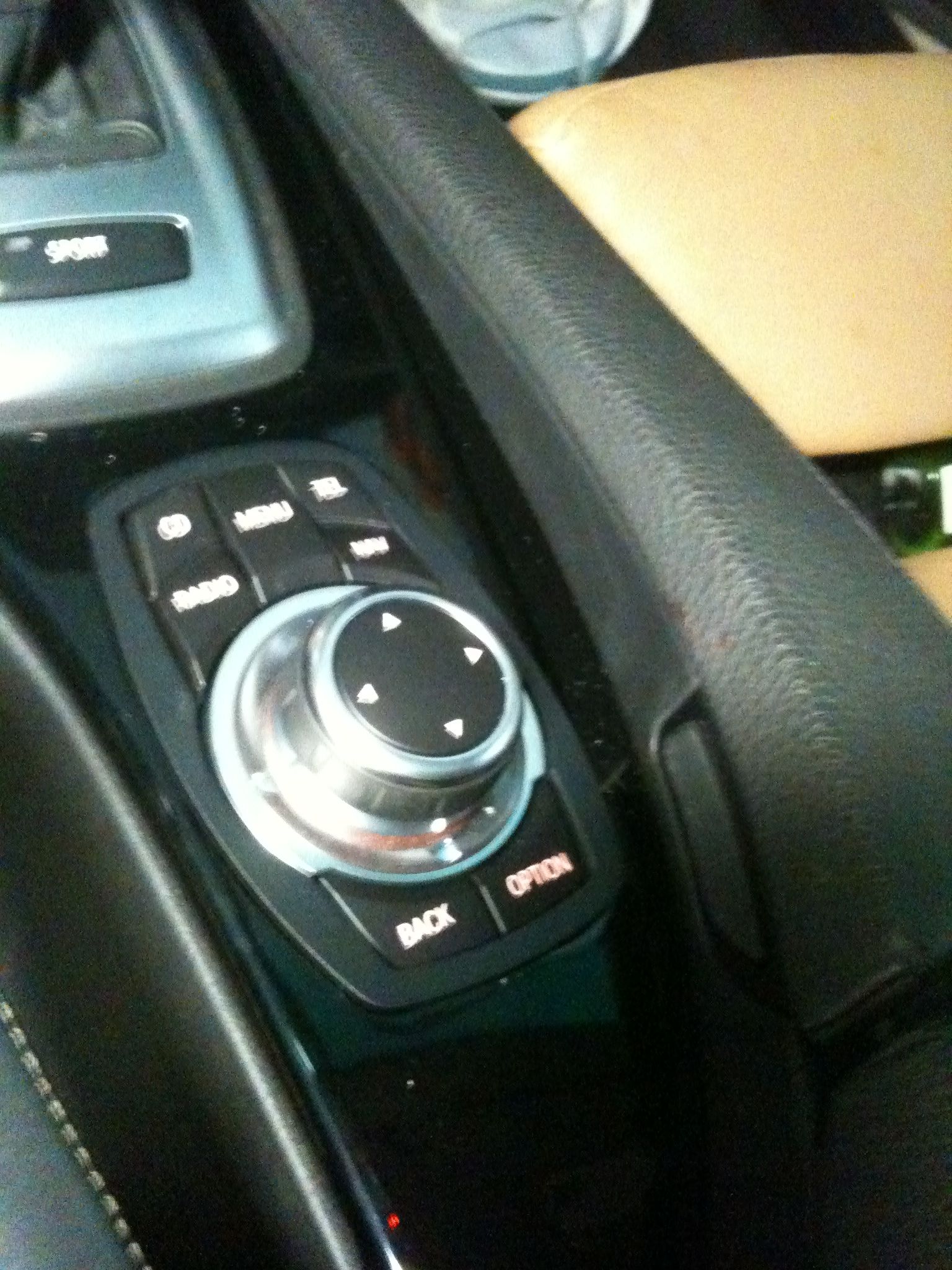
I originally had the old style controller with the menu button and changed this out to just the CIC controller. It?s very nice and much easier to use. I had to search and search and search? That CIC retrofit thread is massive and a lot of it is simply nonsense and a waste of time. It would have been nice if it could have stayed on direct topic? So, I thought I would try and put something together where for at least this part, its all in one spot!
To change from the older style CCC Controller to the newer CIC Controller you will need to do the following.
New Controller ? A good source is eBay you can grab a used one from $100-200. No need getting a new one.
Trim Bezel ? order from your Dealer 51 1 69 169 999 around $30.00
WinKFP ? You will need to have your software updated to work with the new controller.
Remove your center console from the car.
You will have a large wire coupler going to the controller and a small coupler to the menu button. You will be removing four wires from the small connector and tucking them away. They will not be used. I put tape around each for safe keeping. You will remove four wires from the large coupler and install them into the small connector. The small connector will now connect to the new controller. Again, I taped the large coupler and the four loose wires since their not used and tucked them away.
Using a dremmel tool or something similar remove/cut the substrate from your CC base where the new controller will go. I just eyed it and used the new controller as a guide. The removal of the material will provide clearance.
Apply blue painters tape over the CC trim and trace the two openings see attachment that I got from the CIC thread.
Make a template from your new trim bezel and transfer to the CC trim panel. Make it smaller than needed so when you cut the opening out you can still fine trim or file to make it all come together. It?s not easy and it takes patience. If you make it too large you will have to figure out a way to secure it all or by a new trim and start over. I actually practiced on an old one. Using a dremmel tool or something similar cut out the trace area for the new bezel. The trim ring has a recessed area so once you get the trim to install it still may be a little loose. I actually used JB Weld applied to the back area to really secure the trim. Once secured, the new controller comes in from the bottom and clips into the trim bezel.
Install all components in reverse order.
Update with WinKFP
CIC Controller Mod.pdf

I originally had the old style controller with the menu button and changed this out to just the CIC controller. It?s very nice and much easier to use. I had to search and search and search? That CIC retrofit thread is massive and a lot of it is simply nonsense and a waste of time. It would have been nice if it could have stayed on direct topic? So, I thought I would try and put something together where for at least this part, its all in one spot!
To change from the older style CCC Controller to the newer CIC Controller you will need to do the following.
New Controller ? A good source is eBay you can grab a used one from $100-200. No need getting a new one.
Trim Bezel ? order from your Dealer 51 1 69 169 999 around $30.00
WinKFP ? You will need to have your software updated to work with the new controller.
Remove your center console from the car.
You will have a large wire coupler going to the controller and a small coupler to the menu button. You will be removing four wires from the small connector and tucking them away. They will not be used. I put tape around each for safe keeping. You will remove four wires from the large coupler and install them into the small connector. The small connector will now connect to the new controller. Again, I taped the large coupler and the four loose wires since their not used and tucked them away.
Using a dremmel tool or something similar remove/cut the substrate from your CC base where the new controller will go. I just eyed it and used the new controller as a guide. The removal of the material will provide clearance.
Apply blue painters tape over the CC trim and trace the two openings see attachment that I got from the CIC thread.
Make a template from your new trim bezel and transfer to the CC trim panel. Make it smaller than needed so when you cut the opening out you can still fine trim or file to make it all come together. It?s not easy and it takes patience. If you make it too large you will have to figure out a way to secure it all or by a new trim and start over. I actually practiced on an old one. Using a dremmel tool or something similar cut out the trace area for the new bezel. The trim ring has a recessed area so once you get the trim to install it still may be a little loose. I actually used JB Weld applied to the back area to really secure the trim. Once secured, the new controller comes in from the bottom and clips into the trim bezel.
Install all components in reverse order.
Update with WinKFP
CIC Controller Mod.pdf


Thread Starter
Members
Joined: Mar 2011
Posts: 45
Likes: 0
From: Sydney, Australia
Thank you for your help and the effort in posting this!!!

Thanks to Sublime for all of his help!
I originally had the old style controller with the menu button and changed this out to just the CIC controller. It?s very nice and much easier to use. I had to search and search and search? That CIC retrofit thread is massive and a lot of it is simply nonsense and a waste of time. It would have been nice if it could have stayed on direct topic? So, I thought I would try and put something together where for at least this part, its all in one spot!
To change from the older style CCC Controller to the newer CIC Controller you will need to do the following.
New Controller ? A good source is eBay you can grab a used one from $100-200. No need getting a new one.
Trim Bezel ? order from your Dealer 51 1 69 169 999 around $30.00
WinKFP ? You will need to have your software updated to work with the new controller.
Remove your center console from the car.
You will have a large wire coupler going to the controller and a small coupler to the menu button. You will be removing four wires from the small connector and tucking them away. They will not be used. I put tape around each for safe keeping. You will remove four wires from the large coupler and install them into the small connector. The small connector will now connect to the new controller. Again, I taped the large coupler and the four loose wires since their not used and tucked them away.
Using a dremmel tool or something similar remove/cut the substrate from your CC base where the new controller will go. I just eyed it and used the new controller as a guide. The removal of the material will provide clearance.
Apply blue painters tape over the CC trim and trace the two openings see attachment that I got from the CIC thread.
Make a template from your new trim bezel and transfer to the CC trim panel. Make it smaller than needed so when you cut the opening out you can still fine trim or file to make it all come together. It?s not easy and it takes patience. If you make it too large you will have to figure out a way to secure it all or by a new trim and start over. I actually practiced on an old one. Using a dremmel tool or something similar cut out the trace area for the new bezel. The trim ring has a recessed area so once you get the trim to install it still may be a little loose. I actually used JB Weld applied to the back area to really secure the trim. Once secured, the new controller comes in from the bottom and clips into the trim bezel.
Install all components in reverse order.
Update with WinKFP
Attachment 134299
Attachment 134300
Attachment 134301
I originally had the old style controller with the menu button and changed this out to just the CIC controller. It?s very nice and much easier to use. I had to search and search and search? That CIC retrofit thread is massive and a lot of it is simply nonsense and a waste of time. It would have been nice if it could have stayed on direct topic? So, I thought I would try and put something together where for at least this part, its all in one spot!
To change from the older style CCC Controller to the newer CIC Controller you will need to do the following.
New Controller ? A good source is eBay you can grab a used one from $100-200. No need getting a new one.
Trim Bezel ? order from your Dealer 51 1 69 169 999 around $30.00
WinKFP ? You will need to have your software updated to work with the new controller.
Remove your center console from the car.
You will have a large wire coupler going to the controller and a small coupler to the menu button. You will be removing four wires from the small connector and tucking them away. They will not be used. I put tape around each for safe keeping. You will remove four wires from the large coupler and install them into the small connector. The small connector will now connect to the new controller. Again, I taped the large coupler and the four loose wires since their not used and tucked them away.
Using a dremmel tool or something similar remove/cut the substrate from your CC base where the new controller will go. I just eyed it and used the new controller as a guide. The removal of the material will provide clearance.
Apply blue painters tape over the CC trim and trace the two openings see attachment that I got from the CIC thread.
Make a template from your new trim bezel and transfer to the CC trim panel. Make it smaller than needed so when you cut the opening out you can still fine trim or file to make it all come together. It?s not easy and it takes patience. If you make it too large you will have to figure out a way to secure it all or by a new trim and start over. I actually practiced on an old one. Using a dremmel tool or something similar cut out the trace area for the new bezel. The trim ring has a recessed area so once you get the trim to install it still may be a little loose. I actually used JB Weld applied to the back area to really secure the trim. Once secured, the new controller comes in from the bottom and clips into the trim bezel.
Install all components in reverse order.
Update with WinKFP
Attachment 134299
Attachment 134300
Attachment 134301
Senior Members
Joined: May 2011
Posts: 807
Likes: 0
From: nyc
So is it just the cgate that needs updating or the entire ccc? I'm scared shitless to brink my car using winkfp because I want to update my car to see if my bt will pair better with my android contacts list. I've also been turned down by a few shops cautioning me not to update unless I actually have a real problem. Last question is this mod only do able with lci because I'd try it if pre lci can do it too.

New Members
Joined: Jun 2011
Posts: 7
Likes: 0
From: canada
Thanks to Sublime for all of his help!
I originally had the old style controller with the menu button and changed this out to just the CIC controller. It?s very nice and much easier to use. I had to search and search and search? That CIC retrofit thread is massive and a lot of it is simply nonsense and a waste of time. It would have been nice if it could have stayed on direct topic? So, I thought I would try and put something together where for at least this part, its all in one spot!
To change from the older style CCC Controller to the newer CIC Controller you will need to do the following.
New Controller ? A good source is eBay you can grab a used one from $100-200. No need getting a new one.
Trim Bezel ? order from your Dealer 51 1 69 169 999 around $30.00
WinKFP ? You will need to have your software updated to work with the new controller.
Remove your center console from the car.
You will have a large wire coupler going to the controller and a small coupler to the menu button. You will be removing four wires from the small connector and tucking them away. They will not be used. I put tape around each for safe keeping. You will remove four wires from the large coupler and install them into the small connector. The small connector will now connect to the new controller. Again, I taped the large coupler and the four loose wires since their not used and tucked them away.
Using a dremmel tool or something similar remove/cut the substrate from your CC base where the new controller will go. I just eyed it and used the new controller as a guide. The removal of the material will provide clearance.
Apply blue painters tape over the CC trim and trace the two openings see attachment that I got from the CIC thread.
Make a template from your new trim bezel and transfer to the CC trim panel. Make it smaller than needed so when you cut the opening out you can still fine trim or file to make it all come together. It?s not easy and it takes patience. If you make it too large you will have to figure out a way to secure it all or by a new trim and start over. I actually practiced on an old one. Using a dremmel tool or something similar cut out the trace area for the new bezel. The trim ring has a recessed area so once you get the trim to install it still may be a little loose. I actually used JB Weld applied to the back area to really secure the trim. Once secured, the new controller comes in from the bottom and clips into the trim bezel.
Install all components in reverse order.
Update with WinKFP
Attachment 134299
Attachment 134300
Attachment 134301
I originally had the old style controller with the menu button and changed this out to just the CIC controller. It?s very nice and much easier to use. I had to search and search and search? That CIC retrofit thread is massive and a lot of it is simply nonsense and a waste of time. It would have been nice if it could have stayed on direct topic? So, I thought I would try and put something together where for at least this part, its all in one spot!
To change from the older style CCC Controller to the newer CIC Controller you will need to do the following.
New Controller ? A good source is eBay you can grab a used one from $100-200. No need getting a new one.
Trim Bezel ? order from your Dealer 51 1 69 169 999 around $30.00
WinKFP ? You will need to have your software updated to work with the new controller.
Remove your center console from the car.
You will have a large wire coupler going to the controller and a small coupler to the menu button. You will be removing four wires from the small connector and tucking them away. They will not be used. I put tape around each for safe keeping. You will remove four wires from the large coupler and install them into the small connector. The small connector will now connect to the new controller. Again, I taped the large coupler and the four loose wires since their not used and tucked them away.
Using a dremmel tool or something similar remove/cut the substrate from your CC base where the new controller will go. I just eyed it and used the new controller as a guide. The removal of the material will provide clearance.
Apply blue painters tape over the CC trim and trace the two openings see attachment that I got from the CIC thread.
Make a template from your new trim bezel and transfer to the CC trim panel. Make it smaller than needed so when you cut the opening out you can still fine trim or file to make it all come together. It?s not easy and it takes patience. If you make it too large you will have to figure out a way to secure it all or by a new trim and start over. I actually practiced on an old one. Using a dremmel tool or something similar cut out the trace area for the new bezel. The trim ring has a recessed area so once you get the trim to install it still may be a little loose. I actually used JB Weld applied to the back area to really secure the trim. Once secured, the new controller comes in from the bottom and clips into the trim bezel.
Install all components in reverse order.
Update with WinKFP
Attachment 134299
Attachment 134300
Attachment 134301
How do you guys attach the new controller to the console? glue? screws or what?
i know this is an old thread.... sorry
Last edited by mainly; Dec 15, 2018 at 01:31 AM.