


WinKFP Shows All Modules Up To Date?


Thread Starter
Members
Joined: Jan 2009
Posts: 63
Likes: 0

Hi All,
I have gone through all modules on the car (some not flashed since 2004) yet WinKFP shows that the version is already up to date?
I am using DATEN v45 for my E60 imported into WinKFP.
Here is an example of a module not updated since 2005, I get the same result on all modules.
I put the ZBUsb number reported by INPA into WinFKP, it then shows the ECU type and usually has higher version after the number I enter.
I then select update and pick the matching ECU type and then select Prog, but all modules show that they match and require no update.

Am I missing something here, as all modules can't be up to date as it hasn't they have been last programmed from 2004 to 2008..???
Thanks,
Mark
I have gone through all modules on the car (some not flashed since 2004) yet WinKFP shows that the version is already up to date?
I am using DATEN v45 for my E60 imported into WinKFP.
Here is an example of a module not updated since 2005, I get the same result on all modules.
I put the ZBUsb number reported by INPA into WinFKP, it then shows the ECU type and usually has higher version after the number I enter.
I then select update and pick the matching ECU type and then select Prog, but all modules show that they match and require no update.
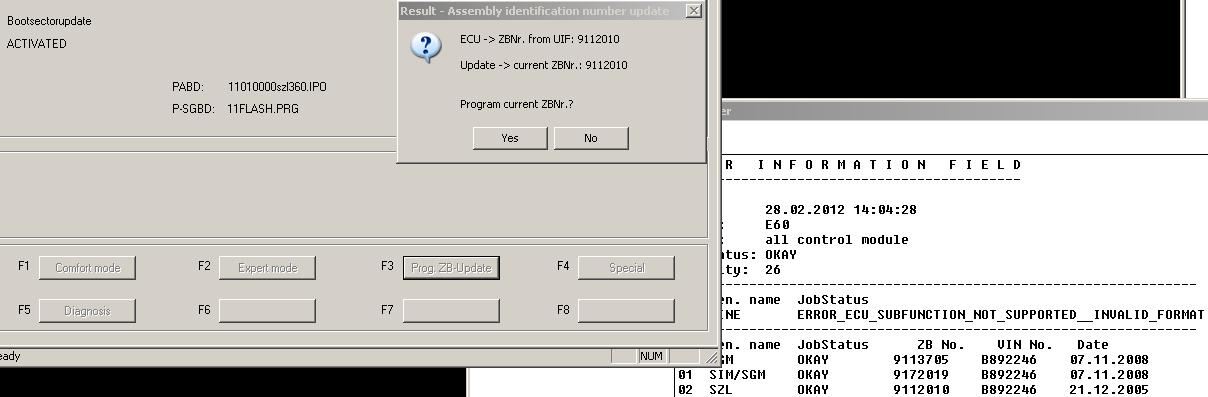
Am I missing something here, as all modules can't be up to date as it hasn't they have been last programmed from 2004 to 2008..???
Thanks,
Mark

Senior Members
Joined: Jun 2009
Posts: 2,680
Likes: 7
My Ride: E60 530i
Hey Mark, are you sure you have v45 daten files? Don't believe everything you download off the internet. You're looking at the UIF in INPA and the 91xxxx part numbers, I can tell your car is up to date.The UIF can be deceiving.

Contributors
Joined: Nov 2005
Posts: 4,719
Likes: 3
From: London, UK
My Ride: BMW E60 520d SE Saloon M47 2.0dTitanium Grey II, Grey−Dakota Leather, Visibility Package, Media Package, Through Load System, Lumbar support − fr seats, Automatic Air Conditioning−Advanced, High beam assistant, Hi−Fi Loudspeak
Model Year: 2006
Hi All,
I have gone through all modules on the car (some not flashed since 2004) yet WinKFP shows that the version is already up to date?
I am using DATEN v45 for my E60 imported into WinKFP.
Here is an example of a module not updated since 2005, I get the same result on all modules.
I put the ZBUsb number reported by INPA into WinFKP, it then shows the ECU type and usually has higher version after the number I enter.
I then select update and pick the matching ECU type and then select Prog, but all modules show that they match and require no update.
Attachment 130704
Am I missing something here, as all modules can't be up to date as it hasn't they have been last programmed from 2004 to 2008..???
Thanks,
Mark
I have gone through all modules on the car (some not flashed since 2004) yet WinKFP shows that the version is already up to date?
I am using DATEN v45 for my E60 imported into WinKFP.
Here is an example of a module not updated since 2005, I get the same result on all modules.
I put the ZBUsb number reported by INPA into WinFKP, it then shows the ECU type and usually has higher version after the number I enter.
I then select update and pick the matching ECU type and then select Prog, but all modules show that they match and require no update.
Attachment 130704
Am I missing something here, as all modules can't be up to date as it hasn't they have been last programmed from 2004 to 2008..???
Thanks,
Mark

Senior Members
Joined: Sep 2011
Posts: 374
Likes: 0
From: Leesburg, VA
My Ride: 07' BMW 550i
Is it worth to download?
What can I do with, meaning all codes and explanation with that, options and ect?
I found a place to download from Russian website. so is it right place?
Also Where do I get a cable and what kind cable is it?
Thanks
What can I do with, meaning all codes and explanation with that, options and ect?
I found a place to download from Russian website. so is it right place?
Also Where do I get a cable and what kind cable is it?
Thanks
Thread Starter
Members
Joined: Jan 2009
Posts: 63
Likes: 0
Senior Members
Joined: Jun 2009
Posts: 2,680
Likes: 7
My Ride: E60 530i


Members
Senior Members
Joined: Apr 2011
Posts: 319
Likes: 0
From: KENT UK ENGLAND
My Ride: BMW 530D M-Sport, Steptronic, Grey Metallic,
Retrofits: Sport Comfort Black Leather, M-Sport Alu Cube Dash Trim, Shadow Line Trim, CCC Pro Nav, Full M5 Conversion, M5 Mirrors, Quad M5, 20" M5 Gloss Black wheels, AC High Panel, Internal Boot Release,
Mods: Xenons, Carbon Fibre Roof, Dension 500, Drilled & Grooved Discs,
how are you checking if theres a update available i dont intend to update any yet just want to see which ones can be updated
i know the bmw coding tool has a option to show ecu updates not sure if this is working
how can i check with winkfp to just see if there is a update availble do i need to be connected to the car to check this or can i just use the ZB numbers off inpa and check on the laptop alone
thanks
i know the bmw coding tool has a option to show ecu updates not sure if this is working
how can i check with winkfp to just see if there is a update availble do i need to be connected to the car to check this or can i just use the ZB numbers off inpa and check on the laptop alone
thanks

