


What DVD type are you using for MP3?


Senior Members
Joined: Apr 2006
Posts: 3,097
Likes: 0
From: UK

Originally Posted by big_ipaq' post='360716' date='Nov 26 2006, 01:09 PM
Well, I am also in the IT industry but my opinion beg to differ. I thought the same as you until I had the same problems with my own disk in a brand new CCC equiped E90 330i my friend has bought. So, it should be something different.
Check out your RECORDER as I advised earlier.
Check out the DVD Media, HD-DVD and Bluray Disc Media list and find out the makes and models of the drives in the CCCs you have used as I advised earlier.
There is no need to reinvent the wheel.
ABC

Thread Starter
Senior Members
Joined: Sep 2004
Posts: 895
Likes: 0
From: Romania
Originally Posted by aybeesea' post='360725' date='Nov 26 2006, 03:28 PM
[...]
Check out the DVD Media, HD-DVD and Bluray Disc Media list and find out the makes and models of the drives in the CCCs you have used as I advised earlier.
Check out the DVD Media, HD-DVD and Bluray Disc Media list and find out the makes and models of the drives in the CCCs you have used as I advised earlier.
I apologize for this, but I surely missed this out.
Senior Members
Joined: Apr 2006
Posts: 3,097
Likes: 0
From: UK
Originally Posted by big_ipaq' post='360741' date='Nov 26 2006, 02:27 PM
I was not aware I can find out what DVD drive my M-ASK DVD unit has (my car is NOT CCC but my 2006 E90 my friend has is but behaves the same) using your above link. Can you please provide me further assistance to find this out?
I apologize for this, but I surely missed this out.
I apologize for this, but I surely missed this out.
b) Read this
c) If interested in gathered problems with a particular brand or make of media read this
d) Find out what make and models of DVD drive the BMW cars in which you have tried your disc and use Google to try to identify media compatability issues with that drive.
Likely we do not all have the same DVD drive in our e60s.
ABC
Senior Members
Joined: Apr 2006
Posts: 3,097
Likes: 0
From: UK
Originally Posted by big_ipaq' post='360752' date='Nov 26 2006, 03:37 PM
Exactly my question. How?
I suspect that, provide they are active in the forum, you may be able to extract that information.
But until you establish which make of drive it is, all other compatability issues (after you have eliminated your burner) are academic.
ABC

Members
Joined: Aug 2005
Posts: 50
Likes: 0
From: Boston, MA
My Ride: Current: 2006 550 - Sport & Cold Weather Packages, Premium Audio and Navigation, Monaco Blue and Biege
Previous: 2001 330Ci - Sport & Premium Packages, Orient Blue and Biege
I have used both Memorex and Phillps +R media (1-8x) with no issues.
With my old DVD burner I would have trouble with MP3 DVDs I burned if ran the recorder at more than 2x with just about any media I tried. I could burn at 4x (the max speed) and it would work on just about everything but the DVD drive in the BMW.
I recently upgraded the to a new drive and can burn happily up to 16x.
With my old DVD burner I would have trouble with MP3 DVDs I burned if ran the recorder at more than 2x with just about any media I tried. I could burn at 4x (the max speed) and it would work on just about everything but the DVD drive in the BMW.
I recently upgraded the to a new drive and can burn happily up to 16x.

Senior Members
Joined: Feb 2006
Posts: 751
Likes: 0
From: Bahrain
My Ride: 2005 525i : Alpine White, Steptronic, Black Interior with Amethyst Leather & Popular Grain Brown, 17" 122-Style Rims, Adaptive Bi-Xenon Headlights, Auto Dimming & Folding Mirrors, Advanced A/C, Sports Steering Wheel, Electrically Adjustable Steering Column, Extended Lighting Package, PDC, Sliding Armrest, Bus Navi, Hi-Fi Sound System (MP3 DVDs), CD Changer, Rear Sunshades..
MODS:M-tech front bumper, Painted Grill, Installed Aux-In, Garage Door Opener (Overhead Compartement), ///M Steering wheel, Wood hand brake trim, Wood gear-shift lever. 35% Tint all around..
Got, ACS Roof Spoiler, but not installed..
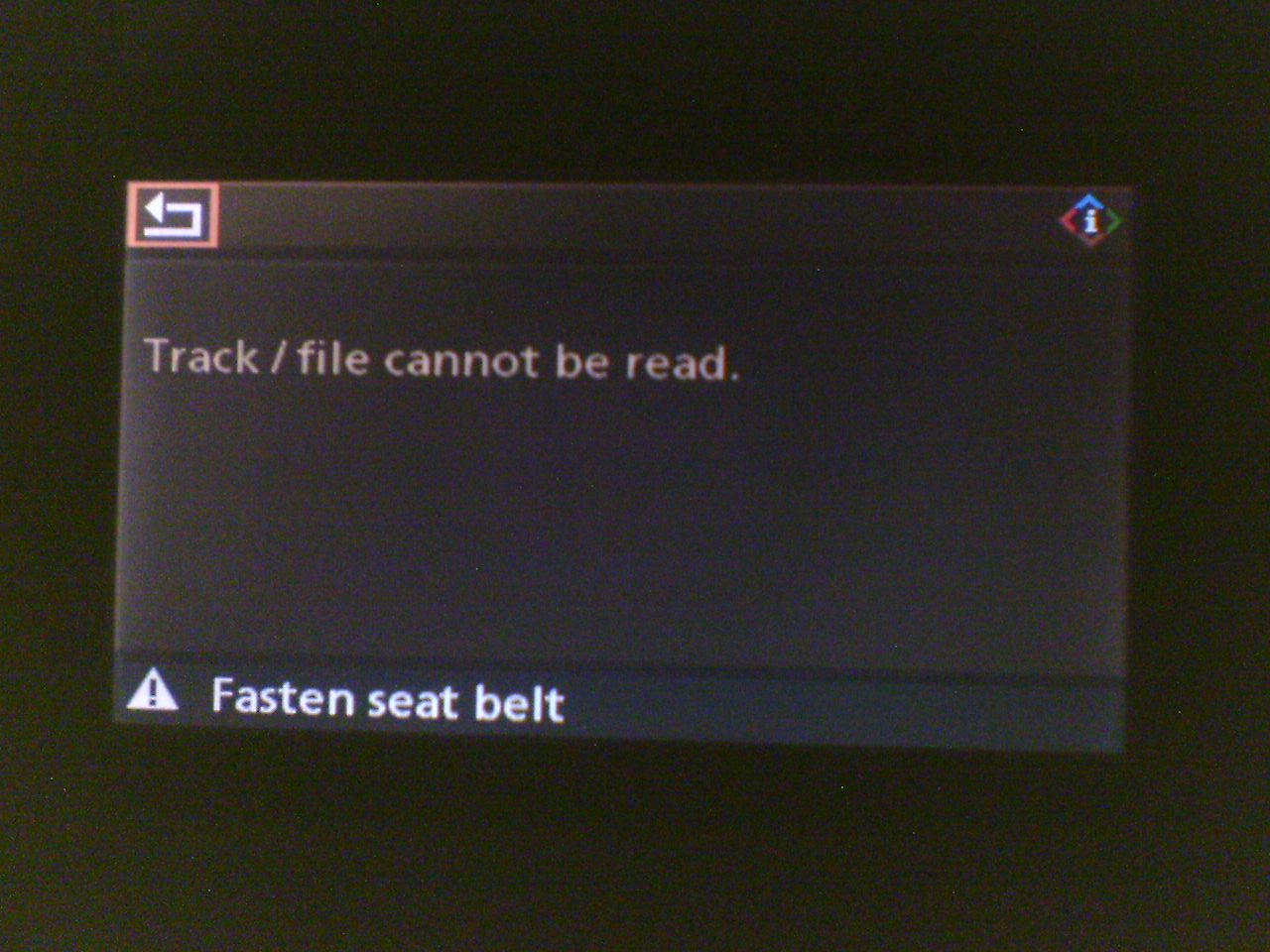
i have used DVD-Rs for a very long time and was getting errors at reading then in the car, it would play some songs then it will say that the car is unable to read the song...
tried writing at a slower speed as i asked around and was told by nicke60gre that it would help , a little improvement but it was still hapening so tried different media at the time i was using "Imation" dvds and to be honest they are very bad in my opinion and i REALLY hate them, then tried samsung, sony, even cheaper brands. still the same errors,it was now cuting out songs and refusing to play others and it was also starting to be embarasing when i had friends in the car... now it was really annoying me, as this was not happening in a friends MY07 E60, and increasingly happening to me...
then forum member freed0m pointed out that he had similar problems andDVD+Rs worked better. so i gave them a try, and have been using them for a couple of weeks and not have had a single error..
picture of the error(s)
so
DVD-R :thumbsdown:
DVD+R
tried writing at a slower speed as i asked around and was told by nicke60gre that it would help , a little improvement but it was still hapening so tried different media at the time i was using "Imation" dvds and to be honest they are very bad in my opinion and i REALLY hate them, then tried samsung, sony, even cheaper brands. still the same errors,it was now cuting out songs and refusing to play others and it was also starting to be embarasing when i had friends in the car... now it was really annoying me, as this was not happening in a friends MY07 E60, and increasingly happening to me...
then forum member freed0m pointed out that he had similar problems andDVD+Rs worked better. so i gave them a try, and have been using them for a couple of weeks and not have had a single error..
picture of the error(s)
so
DVD-R :thumbsdown:
DVD+R


Super Moderator
Joined: Mar 2004
Posts: 17,310
Likes: 2
From: Pittsburgh, PA USA
My Ride: G30 M550i
Model Year: 2018
Originally Posted by baadaaboo' post='360924' date='Nov 26 2006, 11:51 PM
I am sorry, I am new. I didn't even have the car yet but when you say play DVD are you talking about using the navigation system DVD? So, it plays DVD's MP3 when disabling the navigation?
In case you haven't seen it, take a look at the FAQ thread about burning the discs using optimal settings:
http://forums.e60.net/index.php?showtopic=24018
Thread Starter
Senior Members
Joined: Sep 2004
Posts: 895
Likes: 0
From: Romania
Originally Posted by madoon' post='360831' date='Nov 27 2006, 12:07 AM
i have used DVD-Rs for a very long time and was getting errors at reading then in the car, it would play some songs then it will say that the car is unable to read the song...
tried writing at a slower speed as i asked around and was told by nicke60gre that it would help , a little improvement but it was still hapening so tried different media at the time i was using "Imation" dvds and to be honest they are very bad in my opinion and i REALLY hate them, then tried samsung, sony, even cheaper brands. still the same errors,it was now cuting out songs and refusing to play others and it was also starting to be embarasing when i had friends in the car... now it was really annoying me, as this was not happening in a friends MY07 E60, and increasingly happening to me...
then forum member freed0m pointed out that he had similar problems andDVD+Rs worked better. so i gave them a try, and have been using them for a couple of weeks and not have had a single error..
picture of the error(s)
Attachment 26338
so
DVD-R :thumbsdown:
DVD+R
tried writing at a slower speed as i asked around and was told by nicke60gre that it would help , a little improvement but it was still hapening so tried different media at the time i was using "Imation" dvds and to be honest they are very bad in my opinion and i REALLY hate them, then tried samsung, sony, even cheaper brands. still the same errors,it was now cuting out songs and refusing to play others and it was also starting to be embarasing when i had friends in the car... now it was really annoying me, as this was not happening in a friends MY07 E60, and increasingly happening to me...
then forum member freed0m pointed out that he had similar problems andDVD+Rs worked better. so i gave them a try, and have been using them for a couple of weeks and not have had a single error..
picture of the error(s)
Attachment 26338
so
DVD-R :thumbsdown:
DVD+R