


DIY : Change LM1 to LM2


Members
Joined: May 2009
Posts: 2
Likes: 0

Hello,
I sucesfuly change the lm2 and use this DIY(win in lm is correct)(and change rear and front lights+revire like in the official manual), but my car still has faults(blinkers, rear lights, rings in front dont turn on). I attach my trc, I dont know it is for LM2 ar LM1... or must I code (change) trc files too?????
I sucesfuly change the lm2 and use this DIY(win in lm is correct)(and change rear and front lights+revire like in the official manual), but my car still has faults(blinkers, rear lights, rings in front dont turn on). I attach my trc, I dont know it is for LM2 ar LM1... or must I code (change) trc files too?????


Thread Starter
Contributors
Joined: Nov 2005
Posts: 4,719
Likes: 3
From: London, UK
My Ride: BMW E60 520d SE Saloon M47 2.0dTitanium Grey II, Grey−Dakota Leather, Visibility Package, Media Package, Through Load System, Lumbar support − fr seats, Automatic Air Conditioning−Advanced, High beam assistant, Hi−Fi Loudspeak
Model Year: 2006


Contributors
Joined: Mar 2010
Posts: 3,099
Likes: 5
From: Los Angeles, CA
My Ride: BMW
Model Year: 2006
I have a pre-LCI with LCI tails and Bruce cables. I had a brand new LM 2 installed and had the AE welcome lights activated. (All thanks to Simon  )
)
All is working fine. Is it possible to just disconnect the bruce cable adapters and plug straight into the LCI tails or does more coding have to be done?
)All is working fine. Is it possible to just disconnect the bruce cable adapters and plug straight into the LCI tails or does more coding have to be done?


New Members
Joined: Jan 2016
Posts: 221
Likes: 0
From: Vietnam
My Ride: 2006 525i
Model Year: 206
I retrofitted LM2 and did all the coding including Tool32 for the new VIN. Now in NCS expert the vin still shows for LMA but for INPA, the module still shows the old VIN and the ZUSB is not recognized. I tried Winkfp but they still cant recognize Zusb. I have latest v56 daten file and did all updates via dcan cable. The zusb now shows 9****** instead of the correct 9203082 showed in INPA
I also tried using Tool32 and c_fg_schreiben and c_fg_auftrag the LM_AHL_2.prg to write new vin without success. WinKFP still doesnt recognise the ZUSB.
The attached screen shows there are 2 different version of AIF in the module so possibly the previous owner didn't completed his job of write VIN and/or AIF. Any ideas on how should I proceed this? Thanks
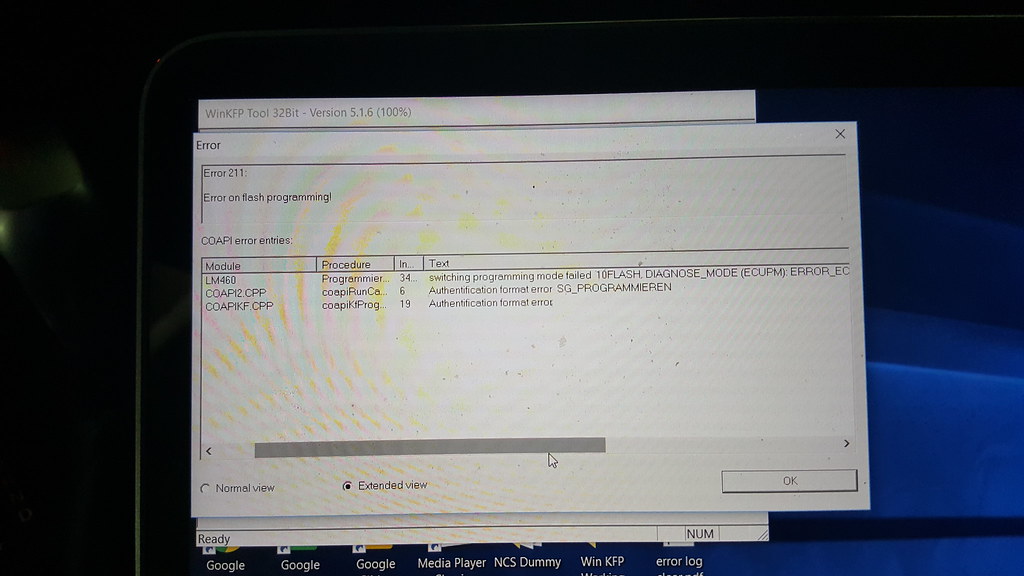
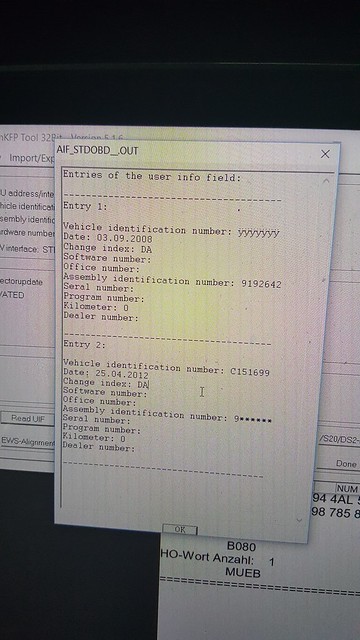
Any suggestion to get this done/
My headlights now are flaking with left beam intermittently goes on and off and the control switch does not work in line with the headlight.
I also tried using Tool32 and c_fg_schreiben and c_fg_auftrag the LM_AHL_2.prg to write new vin without success. WinKFP still doesnt recognise the ZUSB.
The attached screen shows there are 2 different version of AIF in the module so possibly the previous owner didn't completed his job of write VIN and/or AIF. Any ideas on how should I proceed this? Thanks
Any suggestion to get this done/
My headlights now are flaking with left beam intermittently goes on and off and the control switch does not work in line with the headlight.

New Members
Joined: Jan 2017
Posts: 1
Likes: 0
From: Poland
My Ride: E83 3.0d
Hi,
My friend asked me for help in coding a new LM2 module. The problem is that he has AHL lights and bought the module without this option. It does not care for AHL.
Only standard Xenon lights. Do I need to change some pins in the module, or simply cod and remove the code 524 with the FA?
My friend asked me for help in coding a new LM2 module. The problem is that he has AHL lights and bought the module without this option. It does not care for AHL.
Only standard Xenon lights. Do I need to change some pins in the module, or simply cod and remove the code 524 with the FA?

New Members
Joined: Sep 2025
Posts: 2
Likes: 0
Lm1 to lm2
Before Oct 2006 our cars were fixed with an LM1, after that the LM2 was introduced which has a lot of more functions.
I managed to find an LM2 quite cheap from a breaker. Remember that there are various part numbers depending on what lights you have but in the LM2 there are basically two versions one for Xenons and the other Halogens.
These are the steps that I followed to swap the LCM.
1. The actual swap is very straight forward and just involves removing the screw holding the LCM and pulling downward. There is only 1 screw holding the LCM, the other side is held by a metal catch.
2. Next I had to reprogram the LCM. The LCM is the other module in the car that holds the VO, the other being the CAS.
3. Load NCSExpert and choose the CAS and then choose "Enter FA", just copy the complete VIN number that pops up. Close NCSExpert.
4. Load INPA and check the "Ident" of the LMA module and check the part number there. Note that down. Close INPA.
5. Load WinKFP and choose "Comfort Mode", "Choose ZUSB", in the ECU family choose LM460 and make sure that the part number that you took down in Step 4 shows up on the ZB-Number list, other choose another ECU family. Click cancel and then choose "Update ZUSB" and choose LM460 and click OK. Next click "Enter Vin" and enter the VIN number that you copied in Step 3. Click "Done". You will now see a "Prog ZB-Update", cick that. The module will start getting coded and the UIF will be written, which means that the VIN will have been updated. Close WinKFP.
6. Load NCSExpert and then choose the CAS and then using the "FA_WRITE" job process the LMA ECU. Basically what this does is copies the VO from the CAS to the LMA.
7. When you start NCSexpert and instead of choosing CAS you choose LMA you will notice that the old VIN number still loads. This was a big mystery to me because everywhere I could see my VIN instead of the old VIN in the UIF but yet NCSExpert seemed to find it somewhere. Perform a "Read ECU" and note down the .prg file that NCS is using for the LM2. Close NCSExpert.
8. To fix this load Tool32 and load up the .prg file that you noted in Step 7. (my first time using Tool32 btw)
9. Here using trial and error I found a job called "read_fgvin", which when run showed me the old VIN. I then loaded up the job "write_fgvin" which requires one argument and I supplied the VIN noted in Step 3. I ran the job and then when I ran "read_fgvin" again I saw my VIN.
10. Checked this in NCSexpert again and it was my VIN. Makes me think that I didn't need to run Step 5 (WinKFP) at all to update the VIN because the software on the LM2 was already the most recent. Anyway doing that made INPA detect the correct VIN on my LM2 as previously it was just reporting "yyyyyyy" instead of a VIN number. I was also given to understand that you can used the job "FGNR_Schreiben" in NCSexpert to change the VIN of an ECU but for some strange reason that Job doesn't show up for the LMA ECU.
11. Load NCSexpert "Expert Profile" with a blank .man file and just process the LMA ecu again, this will code the LMA to the new VO.
Job done.
P.S. : This DIY assumes you know how to use the tools mentioned here. Please don't ask me how to use them.
I managed to find an LM2 quite cheap from a breaker. Remember that there are various part numbers depending on what lights you have but in the LM2 there are basically two versions one for Xenons and the other Halogens.
These are the steps that I followed to swap the LCM.
1. The actual swap is very straight forward and just involves removing the screw holding the LCM and pulling downward. There is only 1 screw holding the LCM, the other side is held by a metal catch.
2. Next I had to reprogram the LCM. The LCM is the other module in the car that holds the VO, the other being the CAS.
3. Load NCSExpert and choose the CAS and then choose "Enter FA", just copy the complete VIN number that pops up. Close NCSExpert.
4. Load INPA and check the "Ident" of the LMA module and check the part number there. Note that down. Close INPA.
5. Load WinKFP and choose "Comfort Mode", "Choose ZUSB", in the ECU family choose LM460 and make sure that the part number that you took down in Step 4 shows up on the ZB-Number list, other choose another ECU family. Click cancel and then choose "Update ZUSB" and choose LM460 and click OK. Next click "Enter Vin" and enter the VIN number that you copied in Step 3. Click "Done". You will now see a "Prog ZB-Update", cick that. The module will start getting coded and the UIF will be written, which means that the VIN will have been updated. Close WinKFP.
6. Load NCSExpert and then choose the CAS and then using the "FA_WRITE" job process the LMA ECU. Basically what this does is copies the VO from the CAS to the LMA.
7. When you start NCSexpert and instead of choosing CAS you choose LMA you will notice that the old VIN number still loads. This was a big mystery to me because everywhere I could see my VIN instead of the old VIN in the UIF but yet NCSExpert seemed to find it somewhere. Perform a "Read ECU" and note down the .prg file that NCS is using for the LM2. Close NCSExpert.
8. To fix this load Tool32 and load up the .prg file that you noted in Step 7. (my first time using Tool32 btw)
9. Here using trial and error I found a job called "read_fgvin", which when run showed me the old VIN. I then loaded up the job "write_fgvin" which requires one argument and I supplied the VIN noted in Step 3. I ran the job and then when I ran "read_fgvin" again I saw my VIN.
10. Checked this in NCSexpert again and it was my VIN. Makes me think that I didn't need to run Step 5 (WinKFP) at all to update the VIN because the software on the LM2 was already the most recent. Anyway doing that made INPA detect the correct VIN on my LM2 as previously it was just reporting "yyyyyyy" instead of a VIN number. I was also given to understand that you can used the job "FGNR_Schreiben" in NCSexpert to change the VIN of an ECU but for some strange reason that Job doesn't show up for the LMA ECU.
11. Load NCSexpert "Expert Profile" with a blank .man file and just process the LMA ecu again, this will code the LMA to the new VO.
Job done.
P.S. : This DIY assumes you know how to use the tools mentioned here. Please don't ask me how to use them.
thank you.

Thread
Thread Starter
Forum
Replies
Last Post
rackhacker9275
E60, E61 Parts, Accessories and Mods
7
May 11, 2018 04:05 AM
UltimatePeter
DIY: Do It Yourself
5
Sep 28, 2015 09:12 AM
thesalboy
Other BMW Models
2
Apr 8, 2015 09:13 AM

