


Hong Kong E60 sub-Forum


Members
Joined: Sep 2005
Posts: 88
Likes: 0
From: Hong Kong

Originally Posted by Bunbun' date='Sep 22 2005, 02:36 PM
mic325
Can u tell us again how to access the secret menu?? I hv a hard time remembering how many clicks left and how many clicks right....heh heh.? THanks.
sliu_uu, in the secret menu you should be able to tell which software version your car has.? Im not sure if I got updated to version 18.x or 19.x since I read 19.x is already out.
Cheers
Can u tell us again how to access the secret menu?? I hv a hard time remembering how many clicks left and how many clicks right....heh heh.? THanks.
sliu_uu, in the secret menu you should be able to tell which software version your car has.? Im not sure if I got updated to version 18.x or 19.x since I read 19.x is already out.
Cheers
[snapback]173449[/snapback]
 No MP3 on ours thats disappointing :'(

Members
Joined: Aug 2005
Posts: 54
Likes: 0
From: Hong Kong
My Ride: BMW E60 523i 05' Silver Grey|Beige|Light Poplar
Hi all,
Finally, I pickup my 523i from dealer tonight la,
but I got a message on display after I fill in the gas and start to leave, what's the problem exactly??
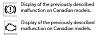
and I found 1 dead pixel in the middle of the screen, I've marked on the check list, can I ask them to replace it? :'(
Thanks a lot~
Finally, I pickup my 523i from dealer tonight la,
but I got a message on display after I fill in the gas and start to leave, what's the problem exactly??
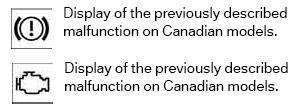
and I found 1 dead pixel in the middle of the screen, I've marked on the check list, can I ask them to replace it? :'(
Thanks a lot~

Thread Starter
Senior Members
Joined: Apr 2004
Posts: 890
Likes: 0
From: Hong Kong
Hi David
Hmmm...I haven't seen either of those pop up in my car. Must bring it to your sales (not to service) for him to look at while the car is still new. If it turns out to be something big, you still might be able to ask for a new replacement car (instead of having a bugged car fixed).
As to dead pixel, mic325 told us he has one too.
Hmmm...I haven't seen either of those pop up in my car. Must bring it to your sales (not to service) for him to look at while the car is still new. If it turns out to be something big, you still might be able to ask for a new replacement car (instead of having a bugged car fixed).
As to dead pixel, mic325 told us he has one too.

Contributors
Joined: Jun 2004
Posts: 3,374
Likes: 0
From: Netherlands
My Ride: [i][b][u]Since 19 august 2004[/u][/b][/i]: [color=red][b]530i[/b] High Executive[/color], Silvergray with beige interior, Popular wood, Servotronic, Sportssuspension, electric foldable and dimmed mirrors, dimmed interior mirror, pappelmaser braun wood, cupholders, styling 123 18" wheels, Logic 7, Steptronic, alarm class 3, electric sunscreen in the rear and suncreens for sidewindows, Comfort seats, heated seats, Xenon with headlightwashers, Adaptive corner lights ALC, Advanced airconditioning, lightpackage, Nav Pro, 6 cd changer, side airbags rearseats, bluetooth siemens S55, chrome kidneys, gearlever with wood, voice recognition retrofit, front windshield with green band.
Waiting for trunkopener button from Hobi :)
What are all these stickers/badges you guys have on your front windshield? There are so much you can hardly see anything through your front window..

Senior Members
Joined: Feb 2005
Posts: 614
Likes: 0
From: Hong Kong
My Ride: 05 Silver Grey 523i | Step, M-Kit, M5 Trunk Finisher, 19" ACS Type IV Wheels, Goodyear F1 GS-D3 245/35/19, Grey Dakota Leather, Maple Wood Sycamore Anthracite, Advanced Climate Control, Electric rear sunblind, Electric folding mirrors with automatic anti-dazzle, Lights package, PDC, Rain sensor, Business Radio, CD Changer
Originally Posted by Bunbun' date='Sep 22 2005, 02:36 PM
mic325
Can u tell us again how to access the secret menu?? I hv a hard time remembering how many clicks left and how many clicks right....heh heh.? THanks.
sliu_uu, in the secret menu you should be able to tell which software version your car has.? Im not sure if I got updated to version 18.x or 19.x since I read 19.x is already out.
Cheers
Can u tell us again how to access the secret menu?? I hv a hard time remembering how many clicks left and how many clicks right....heh heh.? THanks.
sliu_uu, in the secret menu you should be able to tell which software version your car has.? Im not sure if I got updated to version 18.x or 19.x since I read 19.x is already out.
Cheers
[snapback]173449[/snapback]

1. Push down i-Drive knob for about 8 sec
2. Turn right 3 clicks
3. Turn left 3 clicks
4. Turn right 1 click
5. Turn left 1 click
6. Turn right 1 click
7. Push down i-Drive button
8. Go to VersionKontrolle
Senior Members
Joined: Feb 2005
Posts: 614
Likes: 0
From: Hong Kong
My Ride: 05 Silver Grey 523i | Step, M-Kit, M5 Trunk Finisher, 19" ACS Type IV Wheels, Goodyear F1 GS-D3 245/35/19, Grey Dakota Leather, Maple Wood Sycamore Anthracite, Advanced Climate Control, Electric rear sunblind, Electric folding mirrors with automatic anti-dazzle, Lights package, PDC, Rain sensor, Business Radio, CD Changer
Originally Posted by David Lo' date='Sep 22 2005, 10:38 PM
Hi all,
Finally, I pickup my 523i from dealer tonight la,
but I got a message on display after I fill in the gas and start to leave, what's the problem exactly??? Attachment 10676
and I found 1 dead pixel in the middle of the screen, I've marked on the check list, can I ask them to replace it?? :'(
Thanks a lot~
Finally, I pickup my 523i from dealer tonight la,
but I got a message on display after I fill in the gas and start to leave, what's the problem exactly???
Attachment 10676and I found 1 dead pixel in the middle of the screen, I've marked on the check list, can I ask them to replace it?? :'(
Thanks a lot~
[snapback]173562[/snapback]

The "engine" icon means the gas cap is not tight enough, that's why the "Check Engine" light come on. Retighten it, restart the car, and it should go away.
For the "!", if I remember correctly, it is related to brake wear, but since your car is so new, I guess you have a faulty sensor.
I got one dead pixel near the center bottom of the screen, a bright red pixel, I am resisted to go to the service center to have it fix, since they need to tear apart the dash board, and I am worry they will miss something when they reassemble it. I will have them to replace it before my warranty expire.
Thread Starter
Senior Members
Joined: Apr 2004
Posts: 890
Likes: 0
From: Hong Kong
Originally Posted by mic325' date='Sep 22 2005, 09:25 AM
[quote name='David Lo' date='Sep 22 2005, 10:38 PM']Hi all,
Finally, I pickup my 523i from dealer tonight la,
but I got a message on display after I fill in the gas and start to leave, what's the problem exactly??? Attachment 10676
and I found 1 dead pixel in the middle of the screen, I've marked on the check list, can I ask them to replace it?? :'(
Thanks a lot~
Finally, I pickup my 523i from dealer tonight la,
but I got a message on display after I fill in the gas and start to leave, what's the problem exactly???
Attachment 10676and I found 1 dead pixel in the middle of the screen, I've marked on the check list, can I ask them to replace it?? :'(
Thanks a lot~
[snapback]173562[/snapback]
The "engine" icon means the gas cap is not tight enough, that's why the "Check Engine" light come on. Retighten it, restart the car, and it should go away.
For the "!", if I remember correctly, it is related to brake wear, but since your car is so new, I guess you have a faulty sensor.
I got one dead pixel near the center bottom of the screen, a bright red pixel, I am resisted to go to the service center to have it fix, since they need to tear apart the dash board, and I am worry they will miss something when they reassemble it. I will have them to replace it before my warranty expire.
[snapback]173588[/snapback]
[/quote]Also it may come back "squeaky" after the reassemble the dash. Btw David, hv you tried to hold down the "check" button and see if there's any fault messages regarding the "!".
All the best.
Thread Starter
Senior Members
Joined: Apr 2004
Posts: 890
Likes: 0
From: Hong Kong
Originally Posted by 530E60NL' date='Sep 22 2005, 09:08 AM
What are all these stickers/badges you guys have on your front windshield? There are so much you can hardly see anything through your front window..
[snapback]173574[/snapback]

Thread Starter
Senior Members
Joined: Apr 2004
Posts: 890
Likes: 0
From: Hong Kong
Originally Posted by mic325' date='Sep 22 2005, 09:19 AM
[quote name='Bunbun' date='Sep 22 2005, 02:36 PM']mic325
Can u tell us again how to access the secret menu?? I hv a hard time remembering how many clicks left and how many clicks right....heh heh.? THanks.
sliu_uu, in the secret menu you should be able to tell which software version your car has.? Im not sure if I got updated to version 18.x or 19.x since I read 19.x is already out.
Cheers
Can u tell us again how to access the secret menu?? I hv a hard time remembering how many clicks left and how many clicks right....heh heh.? THanks.
sliu_uu, in the secret menu you should be able to tell which software version your car has.? Im not sure if I got updated to version 18.x or 19.x since I read 19.x is already out.
Cheers
[snapback]173449[/snapback]
1. Push down i-Drive knob for about 8 sec
2. Turn right 3 clicks
3. Turn left 3 clicks
4. Turn right 1 click
5. Turn left 1 click
6. Turn right 1 click
7. Push down i-Drive button
8. Go to VersionKontrolle
[snapback]173585[/snapback]
[/quote]Thx mic325, will try it out tomorrow.